- Home Page /
- Electronics /
- Computer Accessories /
- Computer Accessories & Peripherals /
- Cables & Accessories /
- Cables & Interconnects /
- Parallel Cables /
- Hi-Speed USB to DB25 Parallel Port Printer Ad...
0 ratings

Item #:
98707544
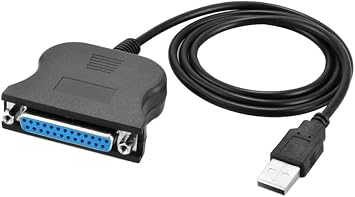
Hi-Speed USB to DB25 Parallel Port Printer Adapter Cable
Item #:
98707544
€ 21
Price Details
Excluding Shipping & Custom charges ( Shipping and custom charges will be calculated on checkout )
*All items will import from US
0 ratings
Write a review
In stock
 Imported from USA store
QTY:
Order now and get it around Thursday, June 25
Secured transaction
Ubuy works hard to protect your security and privacy. Our advanced payment security system ensures confidentiality by encrypting your information during transmission using AES (Advanced Encryption Standards) and SSL (Secure Socket Layer) protocols. Your payment details are 100% secure as we do not share your payment details with third party sellers.
Our Top Logistics Partners


Easily connect any parallel port printer to your laptop or desktop PC with our plug-and-play USB to DB25 adapter cable—no drivers needed!

Buy Now Pay Later

Fast
Shipping

Free
Return*

Secure Packaging

100% Original Products

PCI DSS Compliance

ISO 27001 Certified


Note: Step Down Voltage Transformer required for using electronics products of US store (110-120). Recommended power converters Buy Now.


What Stands Out
High-Speed Transfer
Experience rapid data transfer speeds with this USB to DB25 adapter, ensuring quick communication between your computer and parallel port printers, enhancing productivity and performance.
Plug and Play
Enjoy hassle-free setup with the plug-and-play functionality, eliminating the need for additional drivers and allowing for immediate use with compatible systems.
Durable Construction
Constructed with high-quality materials, this adapter cable offers long-lasting durability and reliable performance, ensuring consistent printing results and a robust connection.
Product Details
| Item Weight | 0.5 lbs (230 grams) |
Who Should Buy?

-
Legacy Printer Users
Ideal for users needing to connect older printers with DB25 ports to modern computers with USB ports.
-
Small Businesses
Perfect for small businesses relying on legacy printing equipment while upgrading to newer computer systems.
-
Hobbyists and Tinkerers
Great for tech enthusiasts who enjoy retro computing and want to integrate old devices with modern setups.

-
Modern Printers
Unsuitable for users with modern printers that exclusively use USB connections without a DB25 interface.
-
High-Speed Needs
Not ideal for those seeking fast data transfer rates, as parallel connections generally have slower speeds than USB.
-
Non-Printer Devices
Inappropriate for connecting devices that are not printers, like scanners or multifunction devices requiring different protocols.
Product Description
Hi-Speed USB to DB25 Parallel Port Printer Adapter Cable
Have any Query? Chat with us
Customer Questions & Answers
-
Question:
What is the Hi-Speed USB to DB25 Parallel Port Printer Adapter Cable?
Answer: The Hi-Speed USB to DB25 Parallel Port Printer Adapter Cable allows you to connect a USB-enabled device to a parallel printer, facilitating data transfer between the two. It essentially converts USB signals into parallel signals, making it ideal for older printers that utilize a DB25 connection.Category: overviewConfidence: high -
Question:
What are the setup requirements for this adapter cable?
Answer: To set up the Hi-Speed USB to DB25 Adapter Cable, you will need a USB port on your computer and a parallel printer with a DB25 port. Simply connect the USB end to your computer and the DB25 end to the printer, and the device should be recognized automatically by most operating systems.Category: setupConfidence: high -
Question:
What specifications does the cable have?
Answer: The Hi-Speed USB to DB25 Parallel Port Printer Adapter Cable typically supports data transfer speeds up to 12 Mbps, is compatible with USB 1.1 and USB 2.0, and utilizes a standard DB25 male connector. It is designed for reliability and ease of use when connecting printers.Category: specsConfidence: high -
Question:
Is the adapter cable compatible with all operating systems?
Answer: The adapter is generally compatible with Windows, Mac, and Linux operating systems. However, compatibility may vary depending on printer drivers and specific printer models, so it's advisable to check individual printer specifications.Category: compatibilityConfidence: medium -
Question:
What accessories come in the box with the adapter cable?
Answer: The package of the Hi-Speed USB to DB25 Parallel Port Printer Adapter Cable typically includes just the adapter cable itself. There are usually no additional accessories or installation discs provided, as the device is designed for plug-and-play functionality.Category: accessoriesConfidence: high -
Question:
How do I maintain the adapter for longevity?
Answer: To maintain the Hi-Speed USB to DB25 Parallel Port Printer Adapter Cable, avoid pulling or yanking on the cable to prevent damage. Keep it free from dust and moisture, and store it in a dry, cool place when not in use. Regularly inspect the connectors for any signs of wear.Category: maintenanceConfidence: medium -
Question:
How can I troubleshoot connection issues with my printer?
Answer: If you are experiencing connection issues with the Hi-Speed USB to DB25 Adapter Cable, first ensure that both ends of the cable are securely connected. Check if the printer is turned on and has the correct drivers installed. If problems persist, try connecting the adapter to a different USB port or testing it with another printer.Category: troubleshootingConfidence: medium -
Question:
What safety guidelines should I follow when using the adapter cable?
Answer: When using the Hi-Speed USB to DB25 Parallel Port Printer Adapter Cable, ensure that it's connected securely without excessive force. Avoid using the cable in wet or damp environments and do not attempt to open or disassemble the adapter, as this may void any warranties and pose safety risks.Category: safetyConfidence: high -
Question:
What is the warranty policy for this adapter cable?
Answer: The warranty policy for the Hi-Speed USB to DB25 Parallel Port Printer Adapter Cable may vary by retailer, but it generally comes with a limited warranty covering defects in materials and workmanship for a specified period. It's recommended to check the purchase terms for specific warranty details.Category: warrantyConfidence: medium -
Question:
Can I return the adapter cable if it doesn't work as expected?
Answer: Yes, most retailers have a return policy for the Hi-Speed USB to DB25 Parallel Port Printer Adapter Cable, typically allowing returns within a certain period if the product is unused and in its original packaging. Be sure to review the specific return policy of the retailer from whom you purchased the cable.Category: returnsConfidence: medium -
Question:
What should I do if the adapter cable is not recognized by my computer?
Answer: If your computer does not recognize the Hi-Speed USB to DB25 Adapter Cable, ensure that the USB port is functioning properly and check if the printer is powered on. Try using a different USB port or rebooting your computer. Additionally, make sure that the proper printer drivers are installed.Category: troubleshootingConfidence: medium -
Question:
What input power does the adapter cable require?
Answer: The Hi-Speed USB to DB25 Parallel Port Printer Adapter Cable operates via the USB connection and does not require an external power source. It draws power directly from the USB port of the computer it's connected to, making it user-friendly and simple to use.Category: powerConfidence: high -
Question:
Does this adapter work with network printers?
Answer: The Hi-Speed USB to DB25 Parallel Port Printer Adapter Cable is designed specifically for local parallel printer connections and may not be compatible with network printers. For network printers, alternative solutions such as network print servers may be needed.Category: compatibilityConfidence: medium -
Question:
Are there different models of this adapter cable available?
Answer: Currently, there may be variations of the Hi-Speed USB to DB25 Parallel Port Printer Adapter Cable available, but specific model designations should be checked with the manufacturer or retailer. Ensure to select the model compatible with your printer's specifications.Category: otherConfidence: medium
AllAboutAdapters Parallel Cables Editorial Review
No editorial reviews found
Customer Reviews & Ratings
1 customers ratings
-
5 Star
0%
-
4 Star
100%
-
3 Star
0%
-
2 Star
0%
-
1 Star
0%
Review this product
Share your thoughts with other customers
Pros
- Easy to use and install
- Compatible with various printers
- High-speed data transfer
- Durable and reliable design
- Great customer support
Cons
- Limited length options available.
Product Price History
Important information
- Limitations : For products shipped internationally, please note that any manufacturer warranty may not be valid; manufacturer service options may not be available; product manuals, instructions, and safety warnings may not be in destination country languages; the products (and accompanying materials) may not be designed in accordance with destination country standards, specifications, and labeling requirements; and the products may not conform to destination country voltage and other electrical standards (requiring use of an adapter or converter if appropriate). The recipient is responsible for assuring that the product can be lawfully imported to the destination country. When ordering from Ubuy or its affiliates, the recipient is the importer of record and must comply with all laws and regulations of the destination country.
- Not all the products listed on Ubuy are for sale, as Ubuy is a global search engine. Products are subject to export/trade regulations.
€ 21
Order now and get it around Thursday, June 25
This item is not restrict in my country.(Please click on above link if this item is not restrict in your country, So our team will review and allow.)
QTY:
Secured transaction
Ubuy works hard to protect your security and privacy. Our advanced payment security system ensures confidentiality by encrypting your information during transmission using AES (Advanced Encryption Standards) and SSL (Secure Socket Layer) protocols. Your payment details are 100% secure as we do not share your payment details with third party sellers.
Our Top Logistics Partners
Fastest cross-border delivery
Features & Benefits
- Turn any USB port into a DB25 virtual parallel port.
- Connect seamlessly with inkjet, laser, and label printers.
- Fully compatible with Windows OS, from XP to Windows 10.
- Plug-and-play design requires no driver installation.
- Supports all three parallel modes: ECP, EPP, and SPP.
- No external power supply needed; powered via USB bus.