- Startseite /
- Software /
- Bildung und Referenz /
- Typing /
- Typing Instructor Bundle - Includes Two Software Progra...
0 ratings


Artikelnr.:
40319663
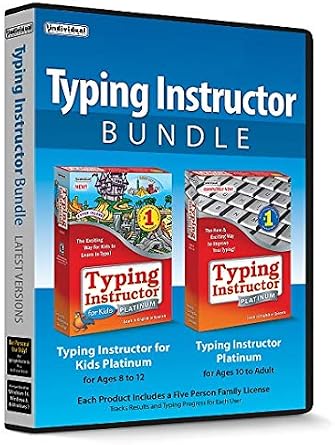
Typing Instructor Bundle - Includes Two Software Programs for Kids & Adults to Learn to Touch Type - CD/PC
90% der Befragten würden dies einem Freund empfehlen
Artikelnr.:
40319663
€ 47
Price Details
Ohne Versand- und Zollkosten ( Versand- und Zollkosten werden an der Kasse berechnet )
*Alle Artikel werden aus USA importiert
0 ratings
Schreiben Sie eine Bewertung
Auf Lager
 Vom USA Store für Sie importiert
QTY:
Bestellen Sie jetzt und erhalten Sie es am Donnerstag, Oktober 29
Gesicherte Transaktion
Ubuy ist bestrebt, Ihre Sicherheit und Privatsphäre zu schützen. Unser fortschrittliches Zahlungssicherheitssystem gewährleistet Vertraulichkeit, indem Ihre Daten während der Übertragung mit AES (Advanced Encryption Standards) und SSL (Secure Socket Layer) Protokollen verschlüsselt werden. Ihre Zahlungsdaten sind 100% sicher, da wir Ihre Zahlungsdaten nicht an Drittanbieter weitergeben.
Unsere besten Logistigpartner


Kids can explore Typer Island! Type your own adventure!

Jetzt Kaufen, Später Bezahlen

Fast
Shipping

Kostenlose
Rücksendung*

Sichere Verpackung

100 % Originalprodukte

PCI DSS-Standards

ISO 27001-zertifiziert






Note: Step Down Voltage Transformer required for using electronics products of USA store (110-120). Recommended power converters Jetzt kaufen.


Besondere Merkmale
Comprehensive Learning
The Typing Instructor Bundle offers both kids and adults engaging lessons, catering to all age groups. Its dual software programs ensure a well-rounded experience for learners at different skill levels.
Interactive Interface
With an interactive, user-friendly interface, this bundle makes learning touch typing enjoyable. It incorporates games and challenges to keep users motivated and encourages consistent practice.
Flexible Accessibility
This product comes on CD/PC format, allowing for flexible access across multiple devices. Users can enhance their typing skills anytime, anywhere, making it perfect for busy schedules.
Produktdetails
| Package Dimensions | 7.44 x 5.35 x 0.63 inches (18.9 x 13.6 x 1.6 cm); 3.35 ounces (94.97 grams) |
| Date First Available | March 22, 2019 |
| Manufacturer | Individual Software |
Für wen ist das Produkt geeignet?

-
Kids Learning
Ideal for children who are beginners and want to develop touch typing skills in a fun and interactive way.
-
Adult Learners
Suitable for adults seeking to improve typing speed and accuracy for personal or professional growth in a comfortable environment.
-
Homeschooling Families
Great option for parents who want to integrate typing skills into their homeschooling curriculum for a well-rounded education.

-
Advanced Typists
Not suitable for experienced typists looking for advanced techniques or specialized typing training beyond basic skills.
PRODUKTBESCHREIBUNG
Typing Instructor Bundle - Includes Two Software Programs for Kids & Adults to Learn to Touch Type - CD/PC
Haben Sie eine Frage? Mit uns chatten
Kundenfragen und -antworten
-
Frage:
Wie kaufe ich Typing Instructor Bundle - Includes Two Software online bei Ubuy ein?
Antworten: Es ist ganz einfach, Typing Instructor Bundle - Includes Two Software online bei Ubuy einzukaufen.. Sie müssen nur nach dem Produkt suchen, beim Bezahlen Ihre Versandart auswählen und es an Ihren Standort liefern lassen. -
Frage:
Ist Typing Instructor Bundle - Includes Two Software in Germany zum Online-Shoppen verfügbar?
Antworten: Ja, bei Ubuy Germany können Sie dieses Produkt zu einem angemessenen Preis kaufen.. Das Typing Instructor Bundle - Includes Two Software ist lokal nicht verfügbar, aber Sie können uns unseren Expressversandservice anvertrauen. -
Frage:
Wie lange dauert es nach der Bestellung, bis ich das Produkt erhalte?
Antworten: Die Lieferzeit Ihres bestellten Produkts hängt davon ab, was Sie bestellt haben und welche Versandart Sie gewählt haben.. Die voraussichtliche Lieferzeit wird während des Bestellvorgangs angegeben. Seien Sie also beim Einkaufen unbesorgt.
Individual Software Typing Editorial Review
**** The Typing Instructor Bundle offers a versatile approach to learning touch typing, catering to both children and adults through its two distinct software programs. Many users have praised the adult program, particularly the 10+ version, which effectively introduces typing skills by teaching the easiest keys first and gradually increasing difficulty. This method not only helps learners build confidence but also engages them with fun activities and games sprinkled throughout the lessons. Parents have noted that the incremental increase in words per minute needed for progression keeps the learning experience both challenging and enjoyable for their older children. Conversely, the children's program focuses more on play than rigorous learning. While younger users enjoy the gameplay elements, some parents feel it leans too heavily on entertainment rather than education, potentially diluting the effectiveness of the lessons. Nonetheless, children do appear to learn, albeit at a potentially slower rate than with the adult program. Installation of the software has generally been a smooth experience for users with Windows 10 compatibility, although there have been reports of confusion regarding compatibility with Windows 11. Some users faced challenges in locating activation keys and have received mixed responses from customer service about resolving such issues. However, positive feedback highlights the ease of adding users and the ability to remove them as they become proficient, making this product an efficient investment for families or individuals looking to enhance typing skills collectively. Overall, the Typing Instructor Bundle appears to be a solid choice for families seeking a fun and engaging way to learn typing, especially for older children and adults, while younger kids can benefit from its playful design, even if more time is spent on gaming than learning. **
Kundenbewertungen
1 Kundenbewertungen
-
5 Sterne
100%
-
4 Sterne
0%
-
3 Sterne
0%
-
2 Sterne
0%
-
1 Sterne
0%
Bewerten Sie dieses Produkt
Teilen Sie Ihre Meinung mit anderen Kunden
Vorteile
- Gradual difficulty progression for the adult program.
- Engaging games reinforce learning.
- Multiple user capability allows for family use.
- Easy installation process on Windows.
Nachteile
- Focus on gameplay may dilute educational value in the children's program.
Platform Trust & Buyer Confidence

JK
Jasmin
Verified buyer
“Great products and very good service: very easy and very fast international delivery.”
9 September 2026 · via Trustpilot
AG
Anke
Verified buyer
“Wonderful online shopping experience, smooth transaction from the start. Payment method works conveniently and delivery is unexpectedly fast and reliable. You go the extra mile for service. What makes this even more amazing, you deliver to Namibia. I will remain a happy Ubuy customer and will increase my purchases for sure! Thank you!”
10 September 2026 · via Trustpilot
H
Hazel
Verified buyer
“Very easy to find the products what you need, and so fast delivery, that’s why I highly recommended to others costumers to used ubuy.”
10 September 2026 · via Trustpilot
O
Opaleye
Verified buyer
“I received exactly what I ordered I was skeptical about your site because that was my first time to order. But the order came timely and neatly packaged. I was not disappointed. Thank you.”
11 September 2026 · via Trustpilot
AC
Adele
Verified buyer
“Easy to find and order what you want on the website. Delivery is quick to the UK”
8 September 2026 · via Trustpilot
WARUM BEI UNS EINKAUFEN
Sicheres Bezahlen
Global Delivery
Einfache Rückgabe
Genuine Products
Produktpreisverlauf
Wichtige Information
- Einschränkungen: Für international versandte Produkte beachten Sie bitte, dass jegliche Herstellergarantie nicht gültig sein könnte; Herstellerservice-Optionen nicht verfügbar sein könnten; Produkthandbücher, Gebrauchsanleitungen und Sicherheitshinweise nicht in der Sprache des Ziellandes verfasst sein könnten; die Produkte (und Begleitmaterialien) könnten nicht im Einklang mit den Standards, Spezifizierungen und Etikettierungsvorgaben des Ziellandes entworfen sein; und die Produkte könnten nicht der Voltzahl und anderen elektrischen Standards des Ziellandes entsprechen (weshalb, falls zutreffend, die Verwendung eines Adapters oder Umwandlers erforderlich sein könnte). Der Empfänger ist dafür verantwortlich sicherzustellen, dass das Produkt legal in das Zielland importiert werden kann. Bei der Bestellung von Ubuy oder seinen Partnern ist der Empfänger der eingetragene Importeur und muss sich an alle Gesetze und Regulierungen des Ziellandes halten.
- Nicht alle auf Ubuy aufgeführten Produkte werden zum Verkauf angeboten, da Ubuy eine globale Suchmaschine ist. Produkte unterliegen Export-/Handelsbestimmungen.
€ 47
Bestellen Sie jetzt und erhalten Sie es am Donnerstag, Oktober 29
Dieser Artikel unterliegt in meinem Land keinen Beschränkungen. (Klicken Sie bitte auf den obigen Link, wenn dieser Artikel in Ihrem Land keinen Beschränkungen unterliegt. Unser Team wird ihn dann prüfen und zulassen.)
QTY:
Gesicherte Transaktion
PCI DSS compliant and ISO 27001:2022 certified, with encrypted payments and full buyer protection on every order.
Unsere besten Logistigpartner
Schnellste grenzüberschreitende Lieferung
Merkmale und Vorteile
- Step-by-step lessons, challenges, tests, and games keep typists engaged.
- Available in English or Spanish with themes like World Travel, Safari, or Time Travel.
- Typing games provide fun practice and build finger-to-key memory.
- Kids and adults have multiple typing plans to choose from.
- Works on Windows 11, 10 & 8.
- Includes free technical support for installation or activation assistance.
Ubuy Assurance
Experience worry-free shopping with 100% original products, PCI DSS-compliant payment security, ISO 27001-certified data protection, the fastest cross-border delivery, free returns *, and secure packaging on every order.